
FB font styles make your Facebook profile, bio, posts, and comments look more attractive and unique. With an FB font generator, you can transform ordinary text into bold letters, cursive writing, aesthetic symbols, Gothic styles, and fancy Unicode characters. You can copy and paste these stylish letters directly into Facebook without installing additional fonts or software.
A Facebook font generator is an easy-to-use online tool for anyone who wants to personalize their social media presence. Whether you need creative profile names, eye-catching status updates, stylish captions, or decorative text for a business page, you can explore different text styles and choose the one that matches your personality or brand.
Facebook Font Generator and Text Converter
An FB font generator is an online text styling tool that converts standard letters into decorative Unicode characters. Instead of changing Facebook’s default font settings, it generates alternative characters that resemble bold, italic, cursive, and other typography styles. Users can enter text, preview different designs, and copy their favorite results.
A Facebook font changer makes text customization simple for beginners. Most tools work directly in a web browser, so you can create stylish text on a computer, tablet, or smartphone. A free FB font generator can be useful for personal profiles, Facebook pages, comments, and promotional content without requiring downloads or special design skills.
Stylish Facebook Fonts and Fancy Text Styles
Stylish Facebook fonts offer many creative options for personalizing ordinary text. Popular choices include bold Facebook text, italic letters, cursive fonts, Gothic lettering, Fraktur styles, Old English characters, bubble letters, small caps, and double-struck text. You can also explore circled letters, tiny text, upside-down lettering, outlined characters, and decorative symbols.
Different font styles create different impressions. Aesthetic fonts can make a profile look elegant, while cute text styles suit friendly posts and personal bios. Gothic and vintage lettering can create a dramatic appearance, whereas simple bold styles are useful for highlighting important words. An FB font generator lets you compare these variations before choosing a design.
Facebook Bio, Profile Name, and Username Fonts
Your Facebook profile is often the first thing people notice when visiting your account. Using an FB font generator for bio text can help you create a distinctive introduction, organize personal interests, or highlight a short description. Script lettering, small caps, and decorative Unicode characters can make your profile text more visually interesting.
You can also experiment with Facebook name font generator styles for nicknames, display text, and creative page branding. However, Facebook has rules for profile names and usernames, and not every decorative character will be accepted. Before using fancy Facebook names, check the platform’s current requirements and make sure your chosen text remains easy to recognize.
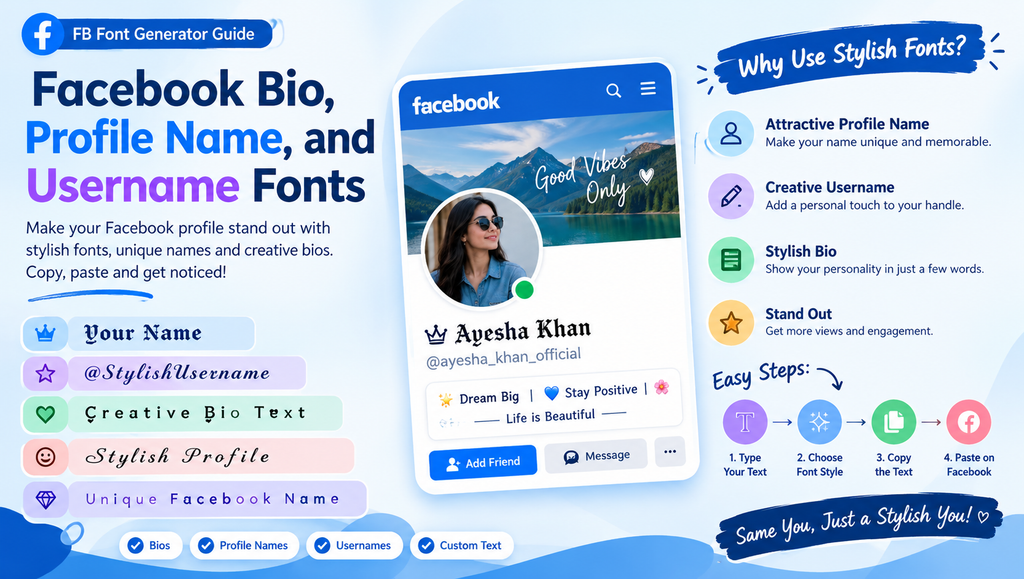
Facebook Posts, Captions, Comments, and Status Text
Creative Facebook posts can benefit from carefully selected text styles. An FB font tool can transform ordinary status updates into bold headlines, decorative quotes, or eye-catching announcements. You can use these styles to emphasize a special message, celebrate an occasion, share an inspirational quote, or make a short caption stand out in a busy feed.
Stylish text can also support Facebook group discussions and business page communication. For example, a bold-looking heading can separate an announcement from its details, while decorative letters can add personality to a promotional caption. Use fancy text selectively, because excessive styling may reduce readability and make longer posts harder to understand.
See more:fb font
Unicode Characters, Special Letters, and Symbols
Most FB font generators rely on Unicode, the international character standard that allows computers and smartphones to represent text from many writing systems. Some decorative styles use mathematical alphanumeric symbols that resemble bold, italic, or double-struck letters. Other generators provide circled characters, special alphabets, hearts, stars, arrows, and ornamental symbols.
Unicode-based text is different from a traditional font file. A font file changes how supported characters appear on a device, while a text generator often replaces ordinary letters with alternative characters that already have their own Unicode code points. This distinction explains why some generated text can be copied between apps, although its appearance may vary across platforms and devices.
Copy and Paste Facebook Fonts
One of the main advantages of an FB font generator is the ability to copy and paste ready-made text. Enter your words, explore the available styles, select a design, and copy the generated result. You can then paste it into a Facebook bio, caption, comment, post, or other supported text field.
This process saves time compared with manually searching for individual special characters. You can prepare several stylish versions of a nickname or caption and reuse your preferred designs whenever needed. Before publishing, preview the copied text in Facebook to check that the characters display correctly and the message remains understandable.
Facebook Font Generator Features and Benefits
A useful FB font generator should offer multiple text styles, a simple interface, quick conversion, and an easy copy function. Real-time previews help users compare different designs without repeatedly typing the same text. A browser-based tool also makes text customization convenient because users can access it without installing additional software.
Mobile compatibility is another important feature. People who manage Facebook accounts from Android phones, iPhones, tablets, or desktop computers benefit from tools that work across screen sizes. The best experience combines fast conversion with readable previews, straightforward copying, and a good selection of stylish text variations.
Facebook Font Compatibility and Limitations
Not every FB font style works perfectly everywhere. Facebook may display Unicode characters differently depending on the operating system, browser, app version, and available character support. Some symbols may appear as empty squares, missing characters, or unexpected designs. A style that looks attractive on one smartphone might look different on another device.
Readability and accessibility also matter when choosing decorative text. Screen readers may pronounce unusual Unicode characters differently from ordinary letters, making heavily stylized content difficult for some users to understand. Use standard text for essential information, avoid excessive decorative characters, and test your selected FB font before publishing important messages.
Facebook Font Uses and Social Media Applications
An FB font generator can support many types of social media content. Personal users can customize short bios, nicknames, status updates, birthday wishes, and inspirational quotes. Content creators can use decorative text to establish a recognizable visual style, while community administrators can add creative touches to group announcements and discussion posts.
Businesses can also experiment with stylish lettering for promotional captions, product announcements, and campaign headlines. However, decorative text should complement the message rather than replace clear communication. For professional branding, use consistent typography, maintain readability, and keep important details such as prices, contact information, and instructions in standard text whenever possible.
Long-Tail Keywords for FB Font SEO
People searching for an FB font generator often want a specific result, such as bold Facebook text, cursive letters, or stylish fonts for a profile bio. Long-tail searches such as “Facebook fonts copy and paste,” “free Facebook font changer,” and “how to generate Facebook text styles” describe clear user needs. Addressing these needs with helpful instructions makes a page more useful to readers.
For SEO, include related search terms naturally in headings, examples, and explanations rather than repeating the same phrase in every sentence. An FB font article should answer practical questions, explain Unicode compatibility, and demonstrate how users can copy and paste generated text. Useful content, a clear structure, and relevant internal links can improve the overall experience for visitors to fontsready.com.
Popular Facebook Font Styles at a Glance
| Font style | Example | Best use |
|---|---|---|
| Bold | 𝐇𝐞𝐥𝐥𝐨 𝐅𝐚𝐜𝐞𝐛𝐨𝐨𝐤 | Headlines and emphasis |
| Italic | 𝘏𝘦𝘭𝘭𝘰 𝘍𝘢𝘤𝘦𝘣𝘰𝘰𝘬 | Quotes and short captions |
| Script | 𝓗𝓮𝓵𝓵𝓸 𝓕𝓪𝓬𝓮𝓫𝓸𝓸𝓴 | Bios and decorative text |
| Gothic | 𝕳𝖊𝖑𝖑𝖔 | Dramatic profile designs |
| Double-struck | ℍ𝕖𝕝𝕝𝕠 | Creative names and headings |
| Monospace | 𝙷𝚎𝚕𝚕𝚘 | Technical or minimalist styles |
| Circled | Ⓗⓔⓛⓛⓞ | Short decorative messages |
| Small caps | ʜᴇʟʟᴏ | Compact profile text |
| Upside-down | oןןǝH | Playful messages |
| Bubble | Ⓗⓔⓛⓛⓞ | Fun captions and nicknames |
Note: These examples use Unicode characters, not traditional installed font files. Some characters may render differently across devices.
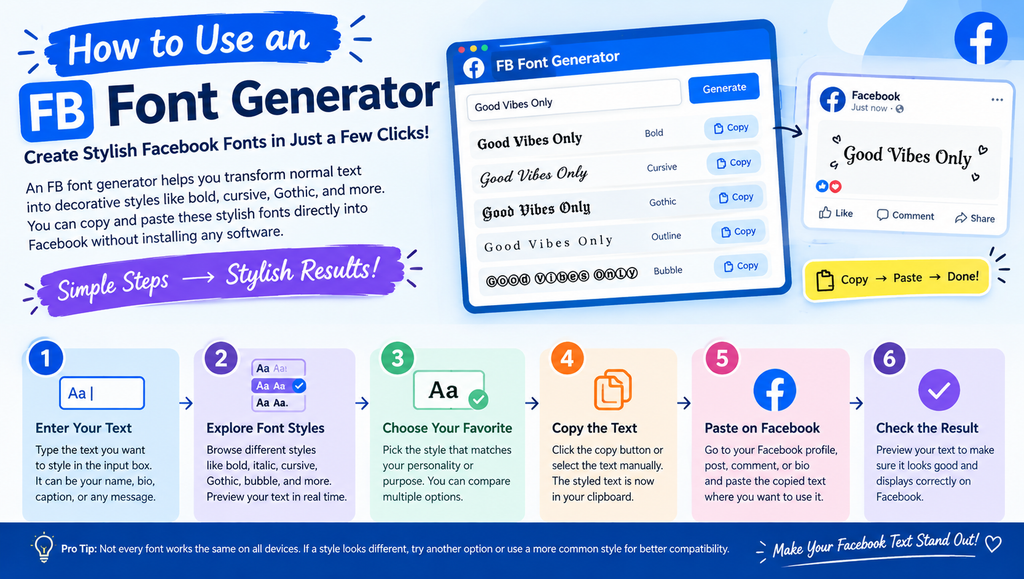
How to Use an FB Font Generator
Using an FB font generator usually takes only a few simple steps:
- Enter your text: Type your name, bio, caption, or status into the generator.
- Explore font styles: Compare bold, cursive, Gothic, bubble, and other available variations.
- Choose your favorite: Select a design that matches your purpose and remains readable.
- Copy the text: Use the copy option or select the generated text manually.
- Paste into Facebook: Add the text to the appropriate profile field, post, comment, or caption.
- Check the result: Preview your content before publishing to identify unsupported characters or formatting issues.
You generally do not need to download a font file because the generated output consists of text characters. Nevertheless, Facebook’s own rules and character support determine where particular styles can be used.
Tips for Choosing the Best Facebook Fonts
Choose your font according to the content rather than selecting the most complicated design. Bold lettering is suitable for short headings, while cursive styles can add personality to brief bios or greetings. For business pages, simple decorative text is often more effective than elaborate characters that distract readers from the message.
Keep accessibility and consistency in mind. Avoid converting every word into unusual Unicode characters, particularly when sharing educational information, customer instructions, or important announcements. Test your chosen FB font on mobile and desktop where possible, and use ordinary text whenever clarity is more important than decoration.
See more:fb font
Conclusion
An FB font generator makes it easy to create decorative text for Facebook profiles, bios, captions, comments, and posts. With options ranging from bold and cursive letters to Gothic, bubble, and double-struck styles, you can personalize your social media content without installing additional software.
For the best results, select readable designs, copy and paste your text carefully, and test its appearance before publishing. Whether you are updating a personal profile or creating content for a business page, the right combination of stylish lettering and clear communication can help your Facebook text feel more distinctive.
1. What is an FB font generator?
An FB font generator is an online tool that converts ordinary text into decorative Unicode characters. It lets users create bold-looking, cursive, Gothic, bubble, and other styles for copying and pasting into supported Facebook text fields.
2. How can I copy and paste Facebook fonts?
Enter your text into a font generator, choose your preferred style, and copy the result. Open Facebook, paste the generated text into a supported field, and preview it before publishing to ensure the characters display correctly.
3. Are Facebook fonts free to use?
Many online Facebook font generators are free to use. They typically work in a browser and do not require users to purchase or install font files. Check the individual tool’s terms if it offers additional paid features.
4. Can I use stylish fonts in my Facebook bio and name?
You can experiment with decorative Unicode text in supported profile fields, but not every character or style is accepted everywhere. Facebook’s profile name and username rules still apply, so check the relevant requirements before making changes.
5. Why do some Facebook fonts appear as squares or strange symbols?
Some devices, operating systems, or applications do not support every Unicode character. As a result, decorative letters may appear differently or show as empty squares. Choose a more widely supported style and test it on your target device before sharing it.