
A Glitch Text Generator is a free online tool that transforms ordinary text into distorted, corrupted, and eye-catching letters. It can create Zalgo text, creepy symbols, broken-looking characters, and unusual typography that makes your words stand out. You can use these styles for gaming names, social media bios, captions, and creative projects.
With a Glitch Text Generator, you can create different text effects without installing software or learning complicated design techniques. Simply enter your text, choose a glitch style, and copy the result. Whether you prefer a subtle digital effect or an extreme horror-inspired appearance, glitch text offers an easy way to personalize your online identity.
Glitch Text Generator, Zalgo Text, and Distorted Text Styles
A Glitch Text Generator changes regular letters into unusual combinations of Unicode characters, creating a broken or distorted appearance. A glitch text maker can produce glitchy letters, corrupted text, creepy text, and chaotic typography that resembles a digital malfunction. These styles are popular among users who enjoy experimental lettering and unusual text designs.
Zalgo text is one of the most recognizable forms of distorted text. A Zalgo text generator adds combining marks above, below, and around ordinary letters to create a chaotic effect. Other styles include cursed text, scary text, broken letters, and digital corruption effects. Each style creates a different appearance, making it easy to choose text that suits your project.
Glitch Text Copy and Paste, Unicode Characters, and Special Symbols
One of the biggest advantages of a Glitch Text Generator is its copy-and-paste functionality. Instead of manually adding unusual symbols, you can enter a word or sentence and generate distorted Unicode text automatically. The resulting glitch letters can often be copied into profile descriptions, gaming usernames, messages, and social media captions.
Unicode combining characters and diacritical marks help create many of these effects. They are special characters that can appear above, below, or around other letters. A Unicode text converter combines these characters with regular text to produce unusual letter combinations. However, the final appearance depends on the font, device, browser, and platform displaying the text.
Glitch Text Generator Features and Customization
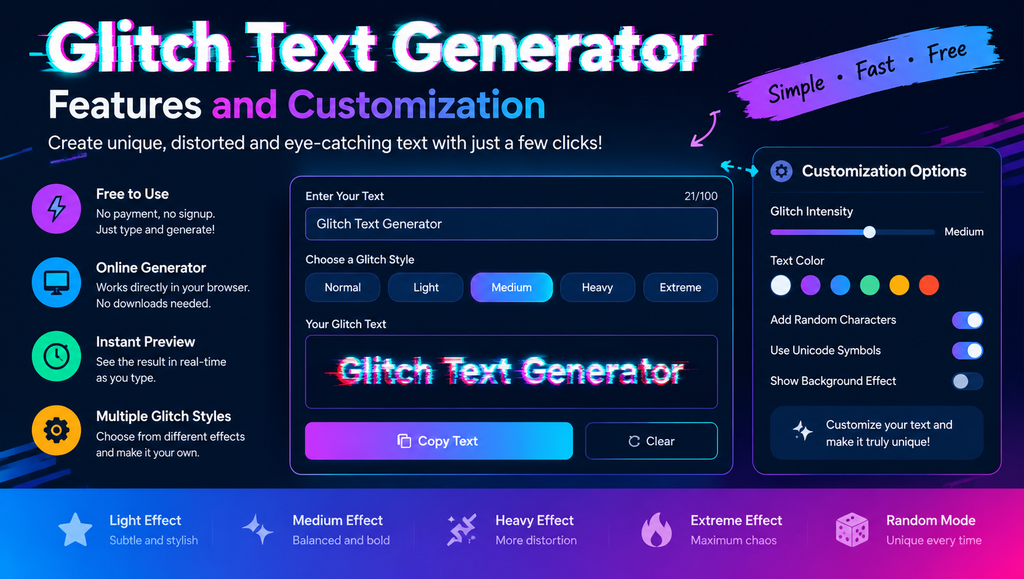
A good Glitch Text Generator should be simple to use and provide an instant preview of the generated text. Users can type into an input box, view the transformed result, and copy it with a single click. Browser-based tools make the process convenient because there is usually no need to download software or create an account.
Customization is another useful feature. Some glitch text tools offer light, medium, heavy, and extreme effects, allowing you to control how distorted the letters appear. A lighter effect is generally easier to read, while a stronger effect creates a more chaotic appearance. Multiple glitch styles and random character combinations also help users experiment with different designs.
Glitch Text for Social Media, Gaming, and Online Profiles
A Glitch Text Generator can help you create distinctive text for Instagram, Facebook, TikTok, Discord, YouTube, X, Reddit, and WhatsApp. You can use decorative letters in bios, captions, display names, and chat messages. A carefully selected glitch effect can give your profile a futuristic, mysterious, or alternative aesthetic.
Gamers can also use glitch text for gaming usernames, clan names, Discord nicknames, and personalized profile descriptions. For example, a simple name can be transformed into a creepy or cyber-inspired design. Before using a generated name, check the game’s character limits and username rules because some platforms reject unusual Unicode characters.
Glitch Typography, Cyberpunk Effects, and Digital Design
Glitch typography is inspired by digital errors, corrupted screens, distorted signals, and experimental graphic design. A Glitch Text Generator can create text that resembles a computer malfunction or a futuristic interface. These effects work particularly well with cyberpunk themes, sci-fi projects, hacker-inspired visuals, and retro digital aesthetics.
Designers often combine glitch lettering with RGB color separation, VHS noise, pixel distortion, static effects, and broken-screen graphics. Although a text generator can create unusual characters, it does not necessarily produce a complete visual glitch effect. For professional posters, thumbnails, and digital artwork, graphic design software may be needed to add colors, shadows, animation, or image-based distortion.
Horror Text, Cursed Text, and Creepy Typography
Horror-themed text is another popular use for a Glitch Text Generator. Distorted letters can make ordinary words appear unsettling, mysterious, or corrupted. These effects are suitable for Halloween captions, creepypasta stories, horror gaming profiles, spooky messages, and dark aesthetic designs.
A cursed text generator or creepy text maker often uses Unicode marks to create an exaggerated appearance. Some styles resemble melting letters, haunted messages, or chaotic symbols. For better results, use extreme distortion for short words and lighter effects for longer messages. This keeps the text visually interesting without making every letter impossible to recognize.
How Glitch Text Works, Unicode Technology, and Text Compatibility
A Glitch Text Generator usually relies on Unicode characters rather than creating a completely new font file. Unicode is a standard that assigns codes to characters used across many writing systems. Combining diacritical marks can be placed alongside regular letters, making text appear distorted when a device renders those characters together.
However, Unicode text does not look identical everywhere. Different operating systems, browsers, fonts, and applications may display the same character sequence differently. Some platforms limit unusual characters, while others may remove or rearrange them. Excessive combining marks can also affect readability and cause text to overlap or extend beyond its normal line.
Glitch Text Generator Alternatives and Related Tools
Several online tools offer glitch effects and other decorative text styles. LingoJam is known for text conversion tools, while Coddy provides browser-based text utilities. Other options include Zalgo text makers, fancy text generators, aesthetic font converters, and Unicode symbol tools. Each service may offer different styles, customization options, and copying features.
When choosing an alternative to a Glitch Text Generator, consider how many styles it provides, whether it offers an instant preview, and how easily you can copy the output. Some tools focus on chaotic Zalgo effects, while others provide cleaner decorative lettering. Testing a few options can help you find a suitable style for your gaming profile, social media account, or creative project.
Benefits, Limitations, and Best Practices for Glitch Text
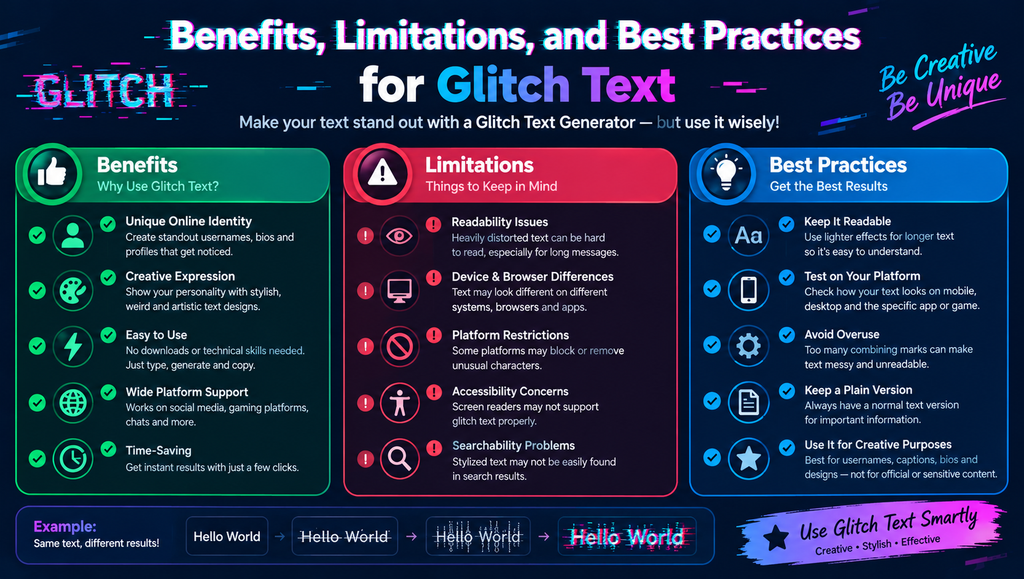
A Glitch Text Generator makes text customization quick and accessible. It can help create unique usernames, eye-catching captions, personalized gaming profiles, and decorative messages without requiring advanced design skills. Most browser-based generators are easy to use, and many allow you to copy the generated result without installing additional software.
Despite these benefits, heavily distorted text can be difficult to read and may not work well with screen readers. Search engines and platform search functions may also handle stylized Unicode text differently from ordinary words. For the best results, use readable text for important information, avoid excessive combining marks, and test your output on the platform where you intend to publish it.
Glitch Text Generator Comparison Table
| Tool or text style | Main purpose | Best use |
|---|---|---|
| Glitch Text Generator | Creates distorted letters | Social profiles and creative text |
| Zalgo Text Generator | Adds chaotic combining marks | Horror messages and spooky captions |
| Fancy Text Generator | Creates decorative Unicode lettering | Bios and display names |
| Unicode Text Converter | Transforms text into Unicode styles | Copy-and-paste formatting |
| Glitch Typography Editor | Creates visual distortion effects | Posters, thumbnails, and digital art |
How to Use a Glitch Text Generator
- Open an online Glitch Text Generator.
- Enter your name, word, or sentence in the text box.
- Select a glitch effect or distortion level if the tool provides customization.
- Preview the generated text and choose a readable version.
- Click the copy option to copy the result.
- Paste the text into your preferred social media profile, game, message, or design project.
- Check how it appears on your target platform before publishing.
The process is straightforward, even for beginners. If a generated result looks broken on your device, try a lighter effect or a different text generator.
See more:Glitch Text Generator
Tips for Getting Better Results with Glitch Text
Start with short words when experimenting with extreme distortion. Usernames, short captions, and titles are generally easier to style than long paragraphs. A lighter Glitch Text Generator effect can preserve readability while still giving your text a distinctive digital appearance.
You should also consider accessibility and compatibility. Avoid using heavily distorted Unicode text for important announcements, instructions, or essential contact information. Keep a plain-text version available whenever possible, and test the result on mobile devices and desktop browsers. These simple steps help you enjoy creative text effects without sacrificing usability.
1. What is a Glitch Text Generator?
A Glitch Text Generator is an online tool that transforms normal text into distorted, corrupted, or glitch-inspired characters. It is commonly used for gaming usernames, social media bios, captions, and creative text designs.
2. Is a Glitch Text Generator free to use?
Many online glitch text tools are free and work directly in a browser. Some provide additional styles or customization options, but basic text conversion often does not require payment or software installation.
3. How do I copy and paste glitch text?
Enter your text into a generator, choose an available effect, and copy the generated result. You can then paste it into a supported social media platform, messaging app, game, or document.
4. Why does glitch text look different on some devices?
Glitch text often uses Unicode combining characters. Different fonts, operating systems, browsers, and applications may render these characters differently, so some effects can appear crowded, misplaced, or unsupported.
5. Can I use glitch text on Instagram, Discord, and gaming platforms?
You can often paste glitch text into Instagram, Discord, and supported gaming platforms. However, compatibility depends on each platform’s character restrictions and text-rendering behavior. Test the result before using it as a permanent username or profile description.